
Sensoft Multiline Installation
Download
- Sensoft Multiline 2.3.1.zip (800 MB)
Installation
- Run the installer in the zip
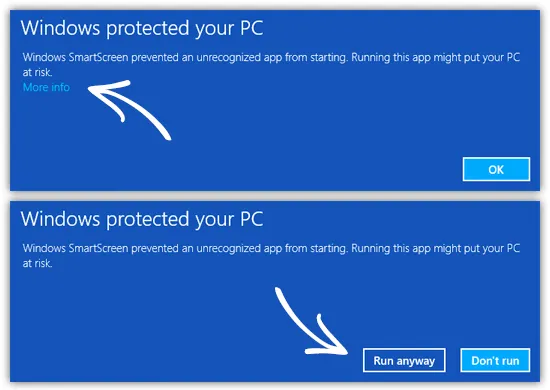
Note: Windows SmartScreen may show a warning when you run the installer. This is not because the installer is unsafe, but because it is not a widely downloaded file. On the warning you have to click on More info and then Run anyway
New in 2.1:
- Support for detecting defects in the corners of rectangular wire
New in 2.0:
- Native 64-bit application
- Added column Criterion to TDMS sheets Faults and Alerts
- Easier calibration test: DC voltage shown in Cleaning mode, and updated calibration files are reloaded if in use
- If you use OPC UA, you need a new activation code